


A desktop UPS buys you 5-15 minutes - enough to save a file and shut down. A power station in UPS mode does the same job, then keeps your internet, CPAP or fridge running for hours. The catch is that a power station is not quite a UPS: it switches over a little slower, rarely tells your computer to shut down, and sits at 100% charge for months. This guide covers what UPS mode really does, which devices tolerate the switchover, how to size the battery, and six in-stock stations that do the job well.
What "UPS mode" on a power station actually does
In UPS (or EPS) mode the station acts as a pass-through. Wall power flows through an internal bypass relay straight to the AC outlets, and a small part of it keeps the battery topped up. When the grid voltage disappears, the station detects it, opens the bypass and starts its inverter. Your devices see a short gap - the switchover time - and then run on battery.
That is how a standby (offline) UPS works. It is different from the two other UPS types:
- Line-interactive UPS (most good desktop units): the inverter stays synchronized and corrects voltage sags without going to battery. Transfer is typically 2-4 ms.
- Online (double-conversion) UPS: the load always runs from the inverter, so there is no transfer gap at all (0 ms). Used for servers and medical or lab gear.
- Power station UPS/EPS mode: standby-style switching at 10-30 ms depending on the model, but with 10-100x the battery of a desktop UPS.
Two practical consequences. First, AC outlets usually switch automatically, but on some models the DC and USB ports stay off until you turn them on - check before you rely on the 12V port for a router. Second, a station in UPS mode spends weeks at full charge with its electronics on, so it runs warmer and may cycle its fan. LiFePO4 batteries (every pick below) handle this far better than the older NMC cells.

A router and modem draw only 15-25W - a 1 kWh station in UPS mode keeps them online for a day or more.
Is 10-20 ms fast enough? Switchover vs your devices
What matters is how long your device can ride through a blackout on its own stored energy. A computer power supply keeps its output steady for a short time after input power disappears - the hold-up time. Intel's ATX 3.0 guideline asks for at least 17 ms at full load; the newer ATX 3.1 relaxed it to about 12 ms at full load. At the partial loads most PCs actually run, real power supplies usually hold 20-30 ms.
How that plays out by device:
- Routers, modems, ONTs, Wi-Fi mesh nodes: small wall adapters often reboot on a 20 ms gap but come back in 1-3 minutes. A 10 ms unit usually avoids the reboot - nice during a video call.
- CPAP machines: a brief gap may restart the motor or reset the humidifier. A 10 ms unit is the comfortable choice for a bedroom. Use it for convenience, not as life support.
- Desktop PCs and gaming rigs: 10 ms is inside ATX hold-up even at full load. 15-20 ms works for most systems at partial load, but a heavily loaded gaming PC can shut off. If a PC crash costs real work, choose 10 ms or put a small desktop UPS between the station and the PC.
- NAS and home servers: 10 ms plus a planned shutdown (see the checklist below), because most stations cannot send a shutdown signal.
- Fridges, freezers, sump pumps, lights: do not care about 10 vs 20 ms. What matters here is surge watts and capacity.
UPS-mode power stations compared
Every model below was active and in stock on Nov 26, 2026. "Switchover" is the figure on our listing or the manufacturer's published UPS list; where a brand does not publish a number we say so rather than guess.
| Model | Price (Nov 26) | Capacity | AC output | Switchover | Best UPS job |
|---|---|---|---|---|---|
| Anker SOLIX C1000 Gen 2 | $549.99 | 1,024 Wh | 2,000W | 10 ms | Router, CPAP, home office |
| Anker SOLIX C1000X Gen 2 | $549.99 | 1,024 Wh | 2,000W | 10 ms | Same as C1000 Gen 2, 9 ports |
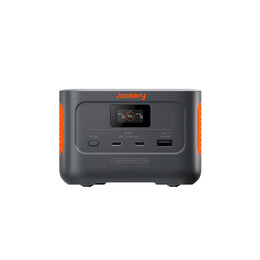
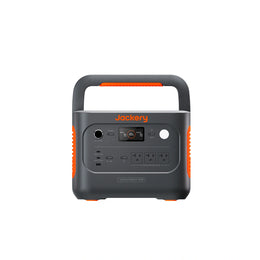
| Jackery HomePower 1000 v2 | $559 | 1,024 Wh | 1,500W | under 10 ms | Bedroom CPAP, desk PC |
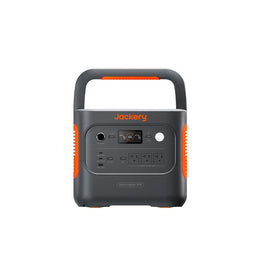
| Jackery HomePower 1000 Plus v2 (White) | $549 | 1,024 Wh | 1,800W | UPS, ms not published | Router, fridge |
| Jackery Explorer 1000 v2 | $559 | 1,070 Wh | 1,500W | up to 20 ms (Jackery) | Router, fridge, lamps |
| PECRON F1000LFP | $399 | 960 Wh | 1,500W | UPS, ms not published | Budget router/modem backup |
| Anker SOLIX C2000X Gen 2 | $999.99 | 2,048 Wh (to 4,096) | 2,400W | 10 ms | Gaming PC, NAS, home office |
| Jackery HomePower 2000 Plus v2 Red Cross | $1,069 | 2,048 Wh (to 12 kWh) | 2,400W | 10 ms (Jackery) | Fridge + sump pump + network |
| Jackery Explorer 1500 Ultra | $1,199 | 1,536 Wh | 1,800W | up to 20 ms (Jackery) | Fridge, lights, TV |
| PECRON E3600LFP | $999 | 3,072 Wh (to 18.4 kWh) | 3,600W (30A UPS) | UPS, ms not published | Sump/well pump, fridge circuits |
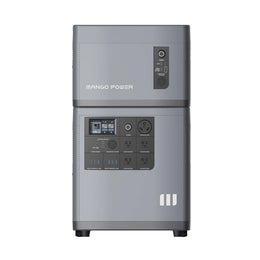
| Mango Power E 7 kWh 120V | $2,299 ($2,149 with auto BF $150) | 7,060 Wh | 3,000W | Not published | Multi-day outages, mPanel circuits |
Runtime math: how big a station do you need?
Size a UPS-mode station on two numbers: output watts (the station must carry everything plugged in, plus start-up surge) and watt-hours (how long it lasts).
Formula: Wh needed = running watts x hours ÷ 0.85. The 0.85 covers inverter losses - AC output on a portable station is roughly 85-90% efficient. Example: a 120W home office for an 8-hour workday is 120 x 8 = 960 Wh, ÷ 0.85 = 1,129 Wh, so a 1 kWh station falls just short and a 1.5-2 kWh unit covers it.
| What you back up | Running watts | Hours wanted | Wh needed (÷0.85) | Station class |
|---|---|---|---|---|
| Router + modem/ONT | 20W | 24 h | 565 Wh | 1 kWh |
| CPAP without humidifier, 2 nights | 40W | 16 h | 753 Wh | 1 kWh |
| CPAP with heated humidifier, 2 nights | 90W | 16 h | 1,694 Wh | 2 kWh |
| Home office (laptop, 27" monitor, router) | 120W | 8 h | 1,129 Wh | 1.5-2 kWh |
| Gaming PC + monitor (gaming) | 450W | 2 h | 1,059 Wh | 1.5-2 kWh, 2,000W+ output |
| Fridge + router + lights | ~110W avg | 24 h | 3,106 Wh | 3 kWh+ |
| Sump pump 1/3 HP (storm day) | ~200W avg (800W running, ~2,400W start) | 12 h | 2,824 Wh | 3 kWh, 2,400W+ surge |
Two rules of thumb. Motors (pumps, fridges) need 2-3x their running watts for a second at start-up, so check the surge rating, not just the continuous one. And leave 20% headroom on output: a 2,000W station carrying a 1,900W load will trip on the first spike. For fridge-specific numbers see how long a power station runs a refrigerator; for pumps on 240V see our well and sump pump guide.
The 6 best power stations to use as a UPS
Picks favor fast switchover, LiFePO4 cells and in-stock availability. Prices were checked on the store on Nov 26, 2026.
1. Anker SOLIX C1000 Gen 2 (1,024 Wh, 10 ms)

The best all-round "set it and forget it" UPS for a home office, router or CPAP. It switches in 10 ms, runs below 20 dB at loads under 200W (quieter than most desktop UPS fans), and its 2,000W output (3,000W peak) has room for a desktop PC, monitor and printer at once. It recharges from the wall in 49 minutes after an outage, so it is ready for the next one. The C1000X Gen 2 is the same station with 9 ports and a car charging cable, at the same price.
Price checked Nov 26, 2026: $549.99 (compare at $799.99). No code needed.
See the C1000 Gen 22. Jackery HomePower 1000 v2 (1,024 Wh, under 10 ms)

Jackery built the HomePower line for the "sits next to the bed or desk all year" job. Switchover is under 10 ms, it runs under 30 dB, and the battery is rated for 6,000 cycles - useful when the station spends years in UPS mode. A 40W CPAP without humidifier gets roughly 21 hours, or about two nights with the humidifier on low.
Price checked Nov 26, 2026: $559 (compare at $615).
See the HomePower 1000 v23. Anker SOLIX C2000X Gen 2 (2,048 Wh, 10 ms)

A gaming PC pulls 300-600W, so a 1 kWh station gives only 1.5-3 hours. The C2000X Gen 2 doubles capacity to 2,048 Wh (expandable to 4,096 Wh with a BP3000), keeps the 10 ms switchover, and its 2,400W output runs a high-end rig, two monitors and the network gear together. It stays around 30 dB under 1,000W. For more Anker models see the Anker power station collection.
Price checked Nov 26, 2026: $999.99 (compare at $1,599.99).
See the C2000X Gen 24. Jackery HomePower 2000 Plus v2 Red Cross Edition (2,048 Wh, 10 ms)

Four 20A outlets and 2,400W continuous (4,800W surge) let it start a 1/3-1/2 HP sump pump while carrying a fridge and router. Jackery lists its UPS switchover at 10 ms. The bigger story is growth: add up to five Battery Pack 2000 Plus v2 units for 12 kWh, which turns a "keep the basement dry tonight" unit into multi-day backup. 6,000-cycle cells and around 30 dB operation suit an always-on corner of the house.
Price checked Nov 26, 2026: $1,069 (compare at $1,176).
See the HomePower 2000 Plus v25. PECRON E3600LFP (3,072 Wh, 3,600W UPS)

At $999 for 3,072 Wh (about $0.33 per Wh) this is the cheapest way to get sump-pump-class capacity in UPS mode. With the 30A input cable it passes up to 3,600W in UPS mode (1,800W on a standard 15A cord), and it expands to 18.4 kWh. PECRON does not publish a switchover time, so we recommend it for pumps, fridges and freezers rather than PCs. More on the brand in PECRON power stations explained.
Price checked Nov 26, 2026: $999 (compare at $1,148.85).
See the E3600LFP6. Mango Power E 7 kWh 120V Home Backup (7,060 Wh)

When the goal is "fridge, freezer, internet and sump pump through a two-day storm," 7 kWh matters more than milliseconds. This bundle pairs the Mango Power E (3,000W) with an expansion battery, uses CATL LFP cells rated for 6,000 cycles, and takes up to 2,000W of solar to refill during the day. With the optional mPanel it wires into your circuits and transfers automatically; Mango does not publish a switchover time, so treat it as circuit backup, not a PC UPS. See Mango Power stations or how to connect a power station to your house.
Price checked Nov 26, 2026: $2,299 (compare at $2,525); $2,149 with the automatic Black Friday $150 off through Dec 1.
See the Mango Power E 7 kWhSetup checklist: running a power station as a UPS
- Turn UPS/EPS mode on if your model needs it (some run pass-through by default, others need the app or a button). Plug the station into a grounded wall outlet - not into a power strip or extension reel.
- Keep the load under 80% of rated output and below the wall circuit limit: on a 15A outlet, the station plus its charging current must stay under about 1,440W.
- Pull the plug to test it. With your devices running, unplug the station from the wall and watch for reboots. Do this before you rely on it, and again every few months.
- Plan PC and NAS shutdown. Most power stations have no USB data link for shutdown software - the Network UPS Tools (NUT) compatibility list shows no data support for Jackery, Anker or Bluetti units. Set your NAS to shut down after X minutes on battery via a small USB UPS behind the station, or schedule a shutdown when it loses its network gateway.
- Give it air. No closets or cabinets - the station runs its electronics around the clock and its fans need to breathe.
- Mind the battery. If the app offers a charge limit, 90% reduces wear on a unit that sits plugged in for months; set it back to 100% before a forecast storm.
- Keep laser printers, space heaters and microwaves off the UPS outlets. Their spikes can trip the station; Jackery also advises against heavy appliances in UPS mode.
When a real UPS (or a home battery) is the better tool
A power station is the right tool when you want hours of backup for a few devices. It is the wrong tool in three cases. If you run a server that must never blink, a line-interactive or online UPS (2-4 ms or 0 ms, with shutdown signaling) is better - or place a small desktop UPS after the station to get both fast transfer and long runtime. If you want the whole house covered, look at a hybrid inverter with a wall or rack battery; we compare the options in portable power station vs home battery. And if outages last days, pair the station with solar panels so it refills each afternoon. Browse more in recommended power stations for home use and the 2000W and 3000W collections.
What buyers ask before using a power station as a UPS
These are the questions that come up most in searches that lead to our store and in Google's question results for this topic, answered with current store data.
"Can I use an Anker or Jackery as a UPS for my computer?"
Yes, if it has a UPS mode and you size the output for your PC. The Anker C1000/C2000X Gen 2 and Jackery HomePower 1000 v2 switch in 10 ms or less, which sits inside the 12-17 ms full-load hold-up of modern ATX power supplies. Older or cheaper stations at 20-30 ms can drop a heavily loaded PC.
"What is the best battery backup for a CPAP?"
For the bedroom, a quiet 1 kWh LiFePO4 station with fast switchover - the HomePower 1000 v2 or C1000 Gen 2. Run the CPAP from DC if your machine has a DC adapter: it skips inverter losses and adds 15-30% runtime. For travel and camping picks, see our camping and CPAP guide.
"Will a power station run my sump pump during a storm?"
A 1/3 HP pump runs at about 800W and may need around 2,400W for a second at start-up. Pick a station with at least 2,400W continuous and a 4,000W+ surge - the HomePower 2000 Plus v2 or PECRON E3600LFP - and 3 kWh or more for a long storm night. Test it by unplugging the station while the pump runs.
"Does pass-through charging wear out the battery?"
In UPS mode most of the power goes around the battery through the bypass, so the battery is not cycling all the time. The main wear factor is sitting at 100% charge, which LiFePO4 tolerates well; a charge limit (where offered) helps further.
FAQ
Can a portable power station be used as a UPS?
Yes. Most current LiFePO4 power stations have a UPS or EPS mode: the station stays plugged into the wall, passes grid power to your devices and switches to battery in about 10-20 ms when the power fails. It works well for routers, CPAP machines, fridges and most computers, and lasts hours instead of the minutes a desktop UPS gives.
Is a 10 ms or 20 ms switchover fast enough for a desktop PC?
Usually. ATX 3.0 power supplies must hold up at least 17 ms at full load and most hold 20-30 ms at typical loads, so 10 ms is safe. 15-20 ms works for most PCs at partial load, but a heavily loaded gaming PC can shut off; choose a 10 ms unit or put a small desktop UPS between the station and the PC.
Can I leave a power station plugged in all the time?
Yes, that is how UPS mode works, and LiFePO4 batteries handle it well. Keep it in a ventilated spot, keep the load under about 80% of rated output, set a 90% charge limit if the app offers one, and test it by unplugging it from the wall every few months.
How long will a power station run a CPAP?
Divide usable energy by the CPAP draw. A 1,024 Wh station gives about 870 Wh usable, so a 40W CPAP without humidifier runs about 21 hours and a 90W CPAP with a heated humidifier about 9-10 hours. Running the CPAP from a DC adapter adds 15-30%.
Can a power station run a sump pump as a backup?
Yes, if it has enough surge. A 1/3 HP sump pump runs at about 800W and can need about 2,400W at start-up, so choose a station with at least 2,400W continuous output, 4,000W or more surge, and 3 kWh or more for an all-night storm.
Is a power station better than a UPS for a NAS or home server?
For runtime, yes. For protection, not always: a line-interactive UPS transfers in about 2-4 ms and can tell the NAS to shut down over USB, while most power stations cannot send a shutdown signal. Many people use both - a small USB UPS plugged into the power station.

Serhii Dovzhenko, Solar & Energy Storage Specialist at Eco Solar Kits · LinkedIn
Serhii is based in Vancouver, BC, and works on product data, system sizing and buyer guides for Eco Solar Kits. He attends solar and energy storage industry conferences and is involved in the community of electricians in Vancouver, BC. Credit for the data verification in this guide goes to Adsec.ca.


